

TL;DR: GST reconciliation means matching the Input Tax Credit (ITC) shown in your GSTR-2B against your purchase register every month, not just at year-end. Differences fall into three buckets: supplier hasn’t filed, invoice details don’t match, or your books have an error, and each needs a different fix. Doing this monthly instead of annually saves weeks of work during GSTR-9 filing and prevents ITC disallowance.
If you have ever claimed ITC based on your purchase invoices only to find it doesn’t match what shows up in GSTR-2B, you already know the problem. GST reconciliation is the process of matching the ITC auto-populated in GSTR-2B, which is generated from your suppliers’ GSTR-1 filings, against what your own purchase register says you paid tax on. When these two don’t match and you don’t fix it, the gap can lead to ITC reversal, interest charges, and notices under Section 73/74/74A during audit.
This guide is written for business owners, accounts managers, and in-house accountants who need to run this process themselves, not for tax professionals looking for a technical explanation. We will walk through the exact monthly workflow: what to download, how to match it, how to categorize every mismatch you find, and what action to take for each type. By the end, you will have a repeatable process you can hand to anyone on your team.
What Is GST Reconciliation?
GST reconciliation is the monthly process of comparing the ITC data auto-populated in your GSTR-2B with the purchase invoices recorded in your own books. The goal is to confirm that every rupee of ITC you plan to claim is actually reflected in the government’s system. Unreconciled gaps between the two records are a leading cause of ITC disallowance and departmental notices.
Why Monthly Reconciliation Matters
Businesses that skip monthly reconciliation and try to sort everything out once a year at GSTR-9 time usually end up scrambling through 12 months of invoices in a matter of days. That is not just stressful, it is risky. The longer a mismatch sits unresolved, the harder it becomes to get a supplier to cooperate, because they may have already closed their books for that period.
Key insight: Once the time limit to amend a GSTR-1 return passes, a supplier generally cannot go back and fix an old invoice, which means unresolved mismatches from earlier months can become permanent ITC losses.
There is also a compliance angle. Claiming ITC that doesn’t match GSTR-2B can attract scrutiny under Section 61 of the CGST Act, alongwith interest on wrongly availed credit. Reconciling monthly means you catch problems while they are still fixable, not after the return window has closed.
GSTR-2A vs GSTR-2B: What’s the Actual Difference
This is where most confusion starts, so let’s be direct about it.
GSTR-2A is a dynamic, real-time statement. It keeps changing as your suppliers file or amend their GSTR-1 returns, even for past periods. If a supplier uploads an invoice late, it will show up in your GSTR-2A retroactively, which makes 2A unreliable as a fixed reference point for any given month.
GSTR-2B is a static, auto-generated statement that locks data based on a fixed cut-off date each month (usually the 14th of the following month). It does not change after generation. This is the document you are supposed to use for claiming ITC, because it gives you a fixed, non-moving number to reconcile against.
| Feature | GSTR-2A | GSTR-2B |
|---|---|---|
| Nature | Dynamic, keeps updating | Static, fixed once generated |
| Basis for ITC claim | Not recommended | Yes, this is the official basis |
| Update frequency | Real-time as suppliers file | Fixed monthly cut-off |
| Use case | Cross-verification, tracking | Actual ITC claim in GSTR-3B |
| Risk if used incorrectly | Can overstate available ITC | Low risk, matches official record |
The practical rule: claim ITC based on GSTR-2B, not GSTR-2A. If you rely on 2A and a supplier’s invoice appears there but not in 2B for that period, claiming it anyway can trigger a mismatch that surfaces during audit.
Pro Tip: Keep a simple tracker of invoices that appear in GSTR-2A but not yet in GSTR-2B. These are your “pending” items to follow up on next month, not credits to claim right now.
The 3 Types of Reconciliation Differences (and How to Fix Each)
Every mismatch you find during reconciliation will fall into one of three categories. Knowing which one you’re dealing with tells you exactly what action to take.
1. Supplier Hasn’t Filed GSTR-1
This is the most common issue. Your purchase register shows an invoice, tax was paid to the supplier, but it simply doesn’t appear in GSTR-2B because the supplier hasn’t filed their GSTR-1 yet, or filed it late enough to miss that period’s cut-off.
What to do: Follow up directly with the supplier. Ask them to confirm the filing status and file it if pending. Do not claim this ITC in your GSTR-3B until it reflects in GSTR-2B. Keep a written record of your follow-up (email is fine) in case you need to show due diligence during an audit.
2. Invoice Amount or Date Mismatch
The invoice exists in both your books and GSTR-2B, but something doesn’t line up, the invoice number is entered differently, the taxable value differs, or the date is off. This usually happens due to a data entry error on either side.
What to do: Compare the invoice copy against what’s reflected in GSTR-2B. If the error is on the supplier’s side, ask them to amend it in their next GSTR-1 filing. If the error is in your own books, correct your entry so future reconciliation doesn’t flag it again.
3. Genuine Error in Your Books
Sometimes the supplier’s filing is correct and the mismatch is because your own purchase register has a typo, duplicate entry, or a missed invoice.
What to do: Correct the entry directly in your books during the current or next reconciliation cycle. This doesn’t need supplier involvement. Just make sure the correction is documented so your audit trail stays clean.
| Difference Type | Root Cause | Action Required | Who Fixes It |
|---|---|---|---|
| Supplier hasn’t filed | GSTR-1 not filed or filed late | Follow up, wait for next GSTR-2B | Supplier |
| Invoice mismatch | Wrong amount, date, or invoice number | Request amendment in next filing | Supplier |
| Books error | Data entry mistake in your records | Correct internally | Your team |
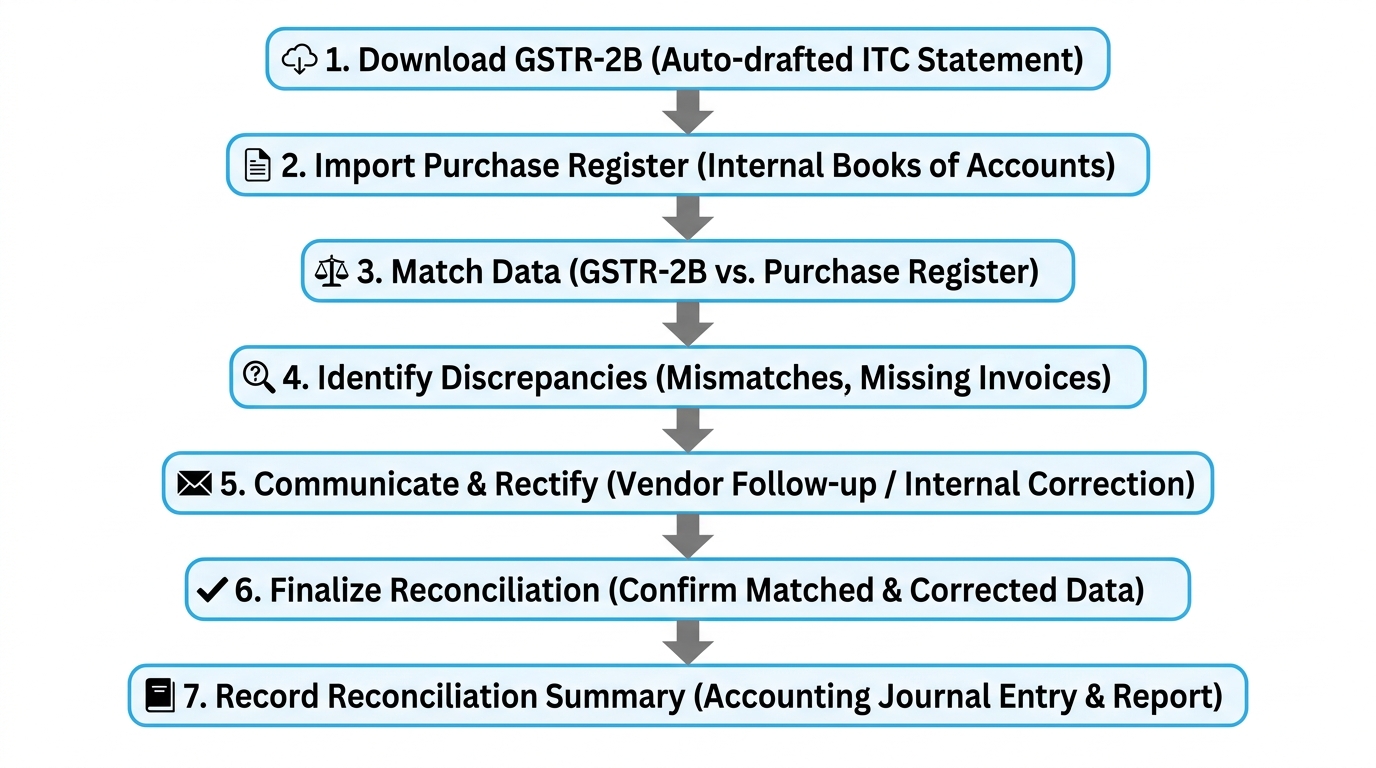
Step-by-Step Monthly Reconciliation Workflow
Here is the actual process to run every month, not a conceptual overview.
Step 1: Download GSTR-2B from the GST portal: Log in to the GST portal, go to Returns Dashboard, and download GSTR-2B for the relevant tax period once it’s generated (after the 14th cut-off). Export it in Excel format for easier matching.
Step 2: Export your purchase register: Pull the purchase register from your accounting software (Tally, Zoho Books, or whatever you use) for the same tax period. Make sure it includes invoice number, invoice date, supplier GSTIN, taxable value, and tax amount.
Step 3: Match records using invoice number: Use VLOOKUP or a similar match formula in Excel to compare invoice numbers between the two sheets. Match on invoice number and supplier GSTIN together, since invoice numbers alone can repeat across different suppliers.
Step 4: Flag and categorize every mismatch: For every row that doesn’t match cleanly, tag it into one of the three categories covered above: not filed, mismatch, or books error. This categorization is what turns a messy spreadsheet into an actionable list.
Step 5: Chase suppliers for unfiled or mismatched invoices: Send a consolidated email or message to each supplier listing the specific invoices that need attention. Keep this communication dated and saved, since it becomes your proof of follow-up if questioned later.
Step 6: Correct internal errors immediately: Fix any books-side errors in the same sitting so they don’t carry forward into next month’s reconciliation.
Step 7: Record the reconciliation summary: Save a monthly reconciliation file with the total ITC as per books, total ITC as per GSTR-2B, and the gap explained by category. This file is what you’ll consolidate later for GSTR-9.
Common Mistakes Businesses Make
Relying on GSTR-2A instead of GSTR-2B: This inflates the ITC you think is available, since 2A includes invoices that may not yet be part of the finalized 2B statement for that period.
Matching only by invoice amount, not invoice number: Two different invoices can accidentally have the same value. Always match on invoice number plus GSTIN to avoid false matches.
Waiting until year-end to reconcile: By the time GSTR-9 filing rolls around, suppliers may no longer be able to amend old invoices, turning fixable mismatches into permanent losses.
Not documenting supplier follow-ups: If you ever face a query about disallowed ITC, having dated proof that you followed up with the supplier matters. Verbal reminders don’t count as evidence.
Ignoring small-value mismatches: Businesses sometimes skip reconciling low-value invoices assuming they don’t matter. Over 12 months, these add up and can trigger scrutiny if the cumulative gap is significant.
Annual Reconciliation for GSTR-9: Why Monthly Discipline Pays Off
GSTR-9 is the annual return, and it requires you to consolidate a full year’s worth of ITC reconciliation into a single filing. If you have done your reconciliation monthly, this becomes a matter of combining twelve clean summary files.
If you haven’t, December turns into a scramble through an entire year of invoices, trying to identify mismatches for suppliers who may no longer respond to queries or amend old filings. The math is simple: monthly discipline means GSTR-9 takes days, not weeks.
Key insight: The window for suppliers to amend GSTR-1 for a given financial year typically closes around November of the following year, which is why unresolved mismatches discovered late in the annual cycle often cannot be corrected at all.
Keep a running annual file where each month’s reconciliation summary gets added as a new tab or row. This gives you a live picture of your ITC position throughout the year and makes GSTR-9 preparation mostly a copy-paste exercise rather than a fresh investigation.
Frequently Asked Questions
What is the difference between GSTR-2A and GSTR-2B? GSTR-2A is a dynamic statement that keeps updating in real time as suppliers file or amend their GSTR-1 returns. GSTR-2B is static and locked at a fixed monthly cut-off date. You should claim ITC based on GSTR-2B, since it gives a fixed, reliable number rather than a constantly moving one.
How do I reconcile ITC in GST? Download your GSTR-2B for the period, export your purchase register from your accounting software, and match records using invoice number and supplier GSTIN. Flag every mismatch into one of three categories: supplier hasn’t filed, invoice details don’t match, or it’s an error in your books, then take the corresponding action.
What should I do if a supplier hasn’t uploaded my invoice? Follow up with the supplier directly and ask them to file or amend their GSTR-1. Keep a dated record of this communication. Do not claim the ITC in your GSTR-3B until the invoice actually reflects in your GSTR-2B for a subsequent period.
Can I claim ITC if GSTR-2B doesn’t show the invoice? Generally, no. ITC claims should be based strictly on what’s reflected in GSTR-2B, since that’s the official static record used for compliance checks. Claiming ITC for invoices missing from GSTR-2B increases the risk of disallowance and interest liability.
How often should I do GST reconciliation? Do it every month, right after GSTR-2B is generated around the 14th of the following month. Monthly reconciliation catches mismatches while suppliers can still amend their filings, and it makes annual GSTR-9 consolidation far faster since you’re combining clean monthly summaries instead of starting from scratch.
Conclusion
GST reconciliation doesn’t need to be a year-end fire drill. When you download GSTR-2B every month, match it against your purchase register by invoice number, and sort every mismatch into one of three clear categories, you catch problems while suppliers can still fix them and while your own team can still correct book errors. This monthly habit is also what makes GSTR-9 filing manageable instead of overwhelming.